
Appearance
Slot Picker in JavaScript
A picker that loads slots and saves the chosen one without reloading the page, using the JSON actions. Use it in a single-page checkout, or alongside a headless front end on the same domain.
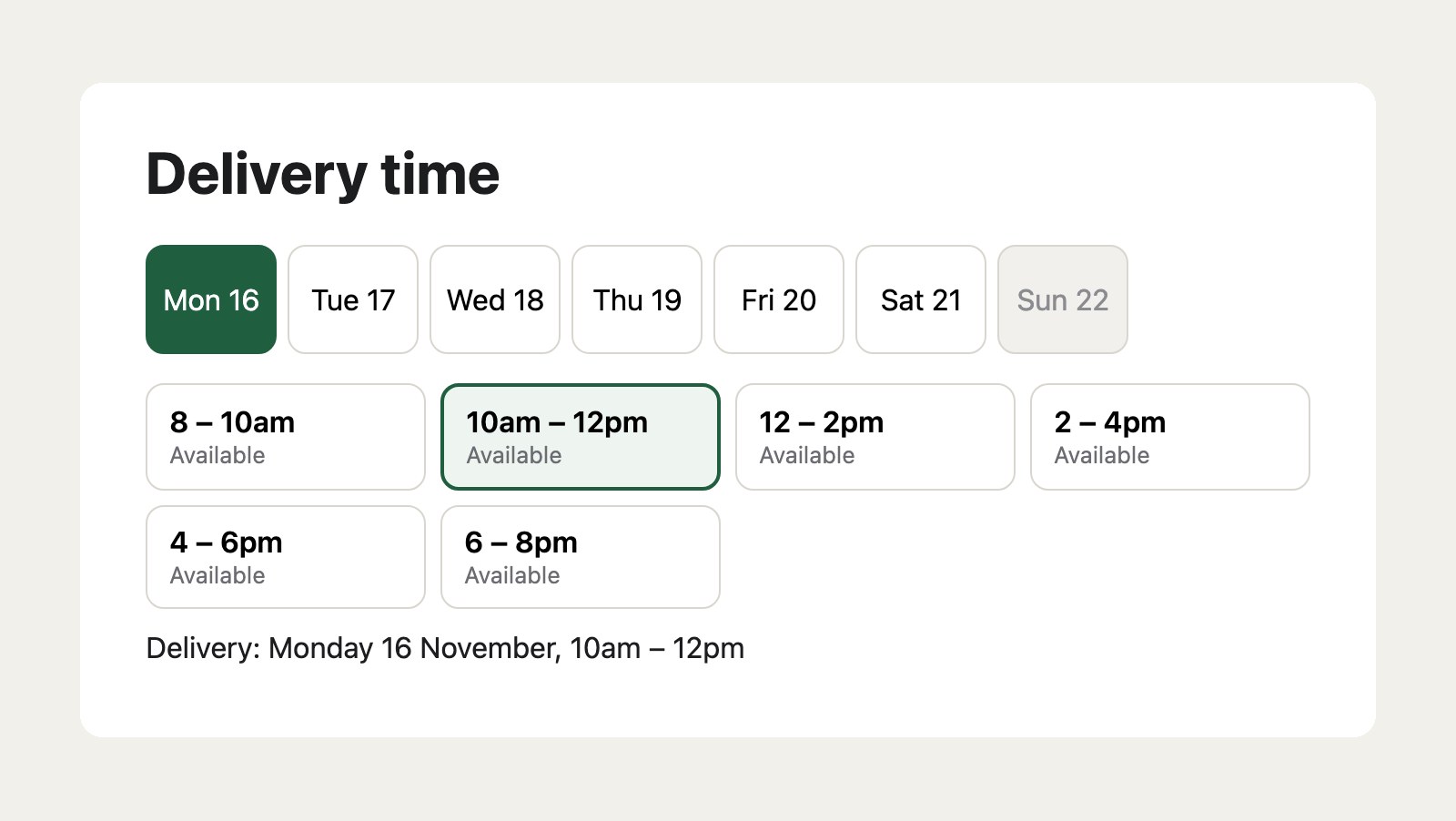
- The days and slots come from
actions/delivery-slots/slots/days, for the cart’s shipping method. - Clicking a time holds it for the cart straight away. If it has just filled up, the picker says so and shows the latest slots.
- Reloading the page shows the chosen slot.
The cart needs a shipping method with a schedule, and an address when the schedule has zones.
Markup and script
twig
<div id="slot-picker">
  <div class="slot-days" role="group" aria-label="Day"></div>
  <div class="slot-times" role="group" aria-label="Time"></div>
  <p class="slot-status" aria-live="polite"></p>
</div>

<script>
  window.csrfTokenName = '{{ craft.app.config.general.csrfTokenName }}';
  window.csrfTokenValue = '{{ craft.app.request.csrfToken }}';
</script>
<script>
(() => {
  const picker = document.getElementById('slot-picker');
  const daysEl = picker.querySelector('.slot-days');
  const timesEl = picker.querySelector('.slot-times');
  const status = picker.querySelector('.slot-status');
  let days = [];
  let chosen = null;
  let openDay = 0;

  const dayName = (ymd) => new Date(ymd + 'T00:00').toLocaleDateString(undefined, { weekday: 'short', day: 'numeric' });

  function render() {
    daysEl.replaceChildren(...days.map((day, i) => {
      const b = document.createElement('button');
      b.type = 'button';
      b.textContent = dayName(day.date);
      b.title = day.unavailableReason || '';
      b.disabled = !day.available;
      b.setAttribute('aria-pressed', i === openDay);
      b.onclick = () => { openDay = i; render(); };
      return b;
    }));
    const day = days[openDay];
    timesEl.replaceChildren(...(day ? day.slots : []).map((slot) => {
      const b = document.createElement('button');
      b.type = 'button';
      const time = document.createElement('strong');
      time.textContent = slot.label;
      const note = document.createElement('small');
      note.textContent = slot.full ? 'Full' : slot.left <= 2 ? `${slot.left} left` : 'Available';
      b.append(time, note);
      b.disabled = slot.full;
      b.setAttribute('aria-pressed', slot.value === chosen);
      b.onclick = () => choose(slot.value);
      return b;
    }));
  }

  async function load() {
    const response = await fetch('/actions/delivery-slots/slots/days', { headers: { Accept: 'application/json' } });
    const data = await response.json();
    days = data.days;
    chosen = data.chosen;
    const chosenDay = days.findIndex((d) => chosen && chosen.startsWith(d.date));
    openDay = chosenDay >= 0 ? chosenDay : Math.max(0, days.findIndex((d) => d.available));
    status.textContent = days.length ? '' : 'No delivery times for this address.';
    render();
  }

  async function choose(value) {
    const body = new FormData();
    body.append(window.csrfTokenName, window.csrfTokenValue);
    body.append('deliverySlot', value);
    status.textContent = 'Saving…';
    const response = await fetch('/actions/delivery-slots/slots/choose', { method: 'POST', headers: { Accept: 'application/json' }, body });
    const data = await response.json();
    if (response.ok) {
      chosen = data.deliverySlot;
      status.textContent = 'Delivery: ' + data.label;
    } else {
      status.textContent = data.message;
      await load(); // The slot may have filled up: show the latest.
    }
    render();
  }

  load();
})();
</script>
To load another method’s slots, such as when the customer switches to pickup, fetch /actions/delivery-slots/slots/days?shippingMethodHandle=pickup.
Styles
css
body { font-family: system-ui, sans-serif; max-width: 640px; margin: 40px auto; padding: 0 16px; color: #1c1d1f; }
.slot-days { display: flex; gap: 6px; overflow-x: auto; padding-bottom: 4px; }
.slot-days button { flex: 0 0 72px; height: 60px; border: 1px solid #d8d6cf; border-radius: 10px; background: #fff; font: inherit; cursor: pointer; }
.slot-days button[aria-pressed="true"] { background: #1f5f3f; border-color: #1f5f3f; color: #fff; }
.slot-days button:disabled { background: #f1f0ec; color: #8a8c90; cursor: not-allowed; }
.slot-times { display: grid; grid-template-columns: repeat(auto-fill, minmax(140px, 1fr)); gap: 8px; margin-top: 12px; }
.slot-times button { text-align: left; padding: 10px 12px; border: 1px solid #d8d6cf; border-radius: 10px; background: #fff; font: inherit; cursor: pointer; }
.slot-times button strong { display: block; font-weight: 600; }
.slot-times button small { display: block; margin-top: 2px; font-size: 0.8em; color: #6b6d72; }
.slot-times button[aria-pressed="true"] { border: 2px solid #1f5f3f; background: #eef4ef; }
.slot-times button:disabled { background: #f1f0ec; color: #8a8c90; cursor: not-allowed; }
.slot-status { min-height: 1.5em; margin-top: 12px; }