
Appearance
Zone Days and Fees
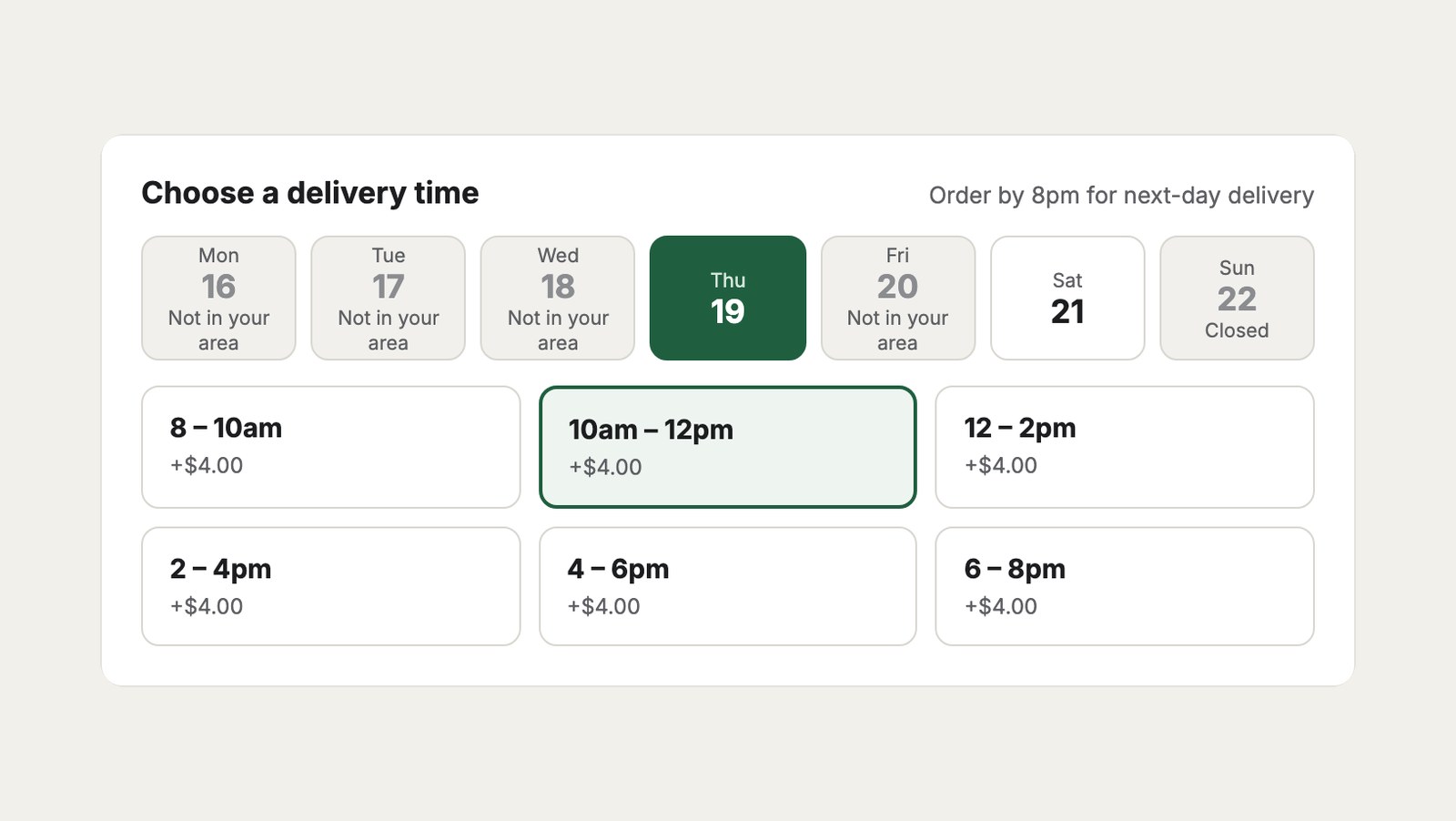
Deliver to the inner suburbs every weekday, the city three days a week, and the Hills on Thursdays and Saturdays for $4 more.
1. Draw the zones
Create a Delivery Zones section with a Geo Maps field, and draw three entries: Inner east, Adelaide CBD and Adelaide Hills. See Delivery Zones.
2. Add them to the schedule
In the Local delivery schedule, under Zones:
| Zone | Days | Orders per slot | Slot fee |
|---|---|---|---|
| Delivery Zones: Inner east | (none ticked: the schedule’s days) | ||
| Delivery Zones: Adelaide CBD | Mon, Wed, Fri | 6 | |
| Delivery Zones: Adelaide Hills | Thu, Sat | 4 | 4 |
What customers see
- An address in Hahndorf sees slots on Thursday and Saturday only. Other days say Not in your area.
- Every Hills slot is $4 more. The fee is added to the order’s shipping as Delivery time, so the summary above shows $15 delivery plus $4.
- At most four Hills orders share a slot, so the driver isn’t sent up the hill for one slot all day.
- An address outside all three zones isn’t offered Local delivery at all, but can still choose Pick up in store.
Showing the fee
The grocery delivery checkout shows the fee in place of “Available”:
twig
{% if slot.isFull %}
  <small>Full</small>
{% elseif slot.isLow %}
  <small class="low">{{ slot.left }} left</small>
{% else %}
  <small>{{ slot.fee ? '+' ~ slot.fee|currency(cart.currency) : 'Available' }}</small>
{% endif %}
To tell customers which zone they’re in, use the chosen slot’s zone:
twig
{% if cart.deliverySlot and cart.deliverySlot.zone %}
  <p>Your area: {{ cart.deliverySlot.zone.title }}</p>
{% endif %}
Pricing the delivery itself
The $15 in the screenshot comes from a Commerce shipping rule for 10 to 30 km, using Geo Maps Pro’s Delivery distance condition. Slot fees add to whatever your shipping rules charge.