
Appearance
Introduction
Delivery Slots lets customers choose when their Craft Commerce order arrives, or when to collect it. It adds a time-slot picker to your checkout, and keeps each slot to the number of orders you can handle.
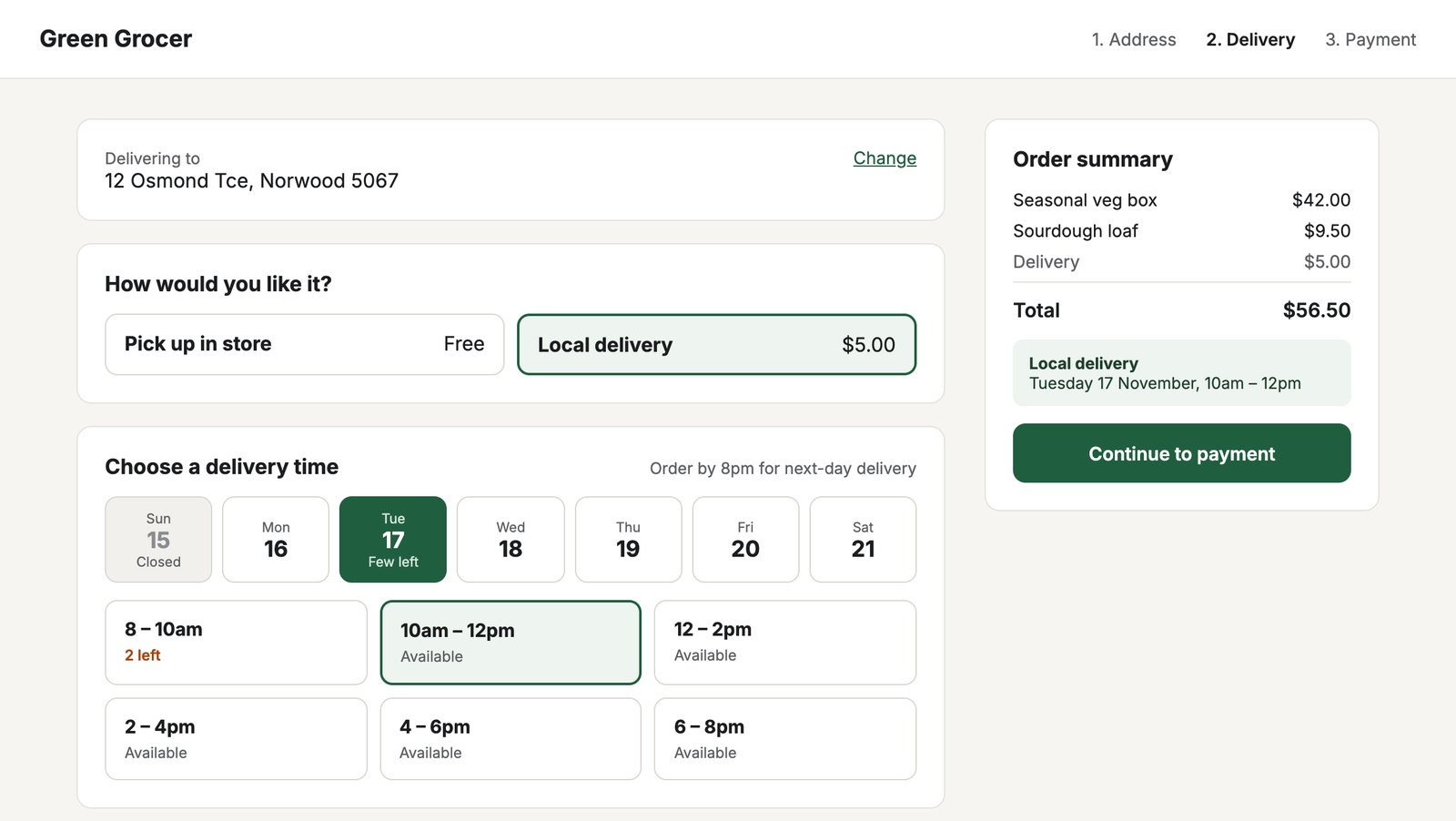
What it does
- Slots per shipping method. Each Commerce shipping method, such as Local delivery or Pick up in store, gets its own time windows and days.
- Orders per slot. A slot closes when it’s full. While a customer pays, their slot is held so nobody else takes the last place.
- Ordering rules. A next-day cut-off, same-day slots, a minimum notice before a slot starts, and how many days ahead to show.
- Closed days. Public holidays and other dates with no slots, with a label customers see.
- Delivery zones. With Geo Maps, give each delivery area its own days, order limit and fee.
- Changes on a date. Close one window or change its limit for a single day, such as when a driver is away.
- Run sheet and packing list. Each day’s orders by slot, zone and suburb to print for drivers, and how many of each item to pack.
- Exports. Orders or the packing list as CSV for any date range, from the control panel or the command line.
- Staff can move orders. Change an order’s slot from the order page when a customer calls, even if it’s full, and email them the new time.
- Mark delivered. Tick orders off on the run sheet as drivers report back.
- At a glance. A dashboard widget, and a Delivery time column and Delivery date filter on Commerce’s orders.
- Add to calendar. A calendar file for confirmation emails.
- Payment check. Customers can’t pay without a slot, or with one that has filled up.
How it fits into Commerce
Delivery Slots doesn’t replace Commerce’s shipping. Your shipping methods and rules still decide which methods an order can use and what they cost. Delivery Slots adds when:
- The customer enters their address and chooses a shipping method, as usual.
- If that method has a schedule, your checkout shows its slots, from
cart.deliverySlotDays. - The chosen slot posts with the cart form as
deliverySlot, and is held for the cart. - When the order is paid, the slot is booked. It shows on the order and the run sheet.
Who delivers the orders?
Your shop does, with its own drivers or a local courier you book. Delivery Slots doesn’t send drivers or connect to couriers: it decides which times customers can choose, keeps each slot to what you can deliver, and gives you the run sheet, packing list and CSV exports to plan each run. Import the CSV into a routing app, or hand a printed page per slot to each driver.